
ATLAS: POWER USAGE OPTIMIZATION

1. Introduction – Problem Statement
Over the past decades, private and public organizations, including telecommunications companies and power utilities, have placed more and more importance on green initiatives and the reduction of greenhouse gas emissions. More specifically, telecoms and utilities are becoming increasingly concerned with the amount of energy used across their networks for economic, environmental, and efficiency reasons.
However, it can be difficult for these entities to track the energy they consume and to determine the extent at which they are using energy efficiently. In fact, many telecom companies do not track their power consumption across their central offices, headends and huts, leaving them without the key metrics needed to evaluate how efficiently they are using energy. Having clear energy related KPIs would help telecom operators reduce energy costs, extend equipment life, and prevent costly downtime. The insights gained would allow for smarter infrastructure investments, optimized operations, and improved network reliability, while also supporting sustainability goals.
This use case will focus on methods with which power utilities and telecoms can track power usage efficiency, using the Atlas software alongside other Multitel products. We will discuss important elements that are relevant to track power usage efficiency, and how they can be monitored. We will also detail how the Power Usage Effectiveness (PUE) can automatically be calculated and reported in Atlas, thus allowing users to quickly identify sites with low power usage effectiveness and optimize the power usage at those sites.
2. Power Monitoring in Telecom Sites
As stated above, to ensure that power consumption and efficiency is tracked at every site, it is necessary for telecom companies and power utilities to have remote visibility of power-related data. For example, it is crucial to monitor the AC main power at the sites and the total DC plant power. The former represents the power required by all the equipment located at the site (e.g., the site’s total power consumption). The latter represents the power consumed by the core telecommunications equipment. Monitoring both components gives an excellent idea of the fraction of the site’s energy used for its core purpose, and thus its power usage efficiency. In the following subsections, the ways by which the AC main power and total DC plant power can be monitored and reported into the Atlas software will be detailed.
2.1 Monitoring the Sites’ AC Main Power
Monitoring the sites’ AC main power in a telecommunications network not only enables users to be notified in case of a power outage, but also allows them to keep track of the total power consumption at every site. As it will be covered later, the total facility power of the sites will also be used to compute its power usage effectiveness (PUE), which describes the energy usage efficiency at telecommunication sites.
To monitor the sites’ AC main power, energy meters must be used. For instance, Multitel provides a universal energy meter that can be pre-configured for a quick and easy installation, allowing users to monitor real-time power at their sites. More specifically, this energy meter enables the measurement of the following parameters:
- Active reactive and apparent energy/power
- Peak power
- Predictive demand
- Current
- Peak current demand

Figure 1: Multitel’s Power and Energy Meter
As a result, energy meters enable seamless monitoring of the power consumption at the site. Furthermore, this energy meter uses Modbus RTU communication, making it compatible with Multitel’s iO Platform product line. This product line consists of three products — the iO mini, the iO Gateway and the iO Supervisor — which are all vendor-agnostic and can integrate any device using the following communication protocols: Modbus RTU, Modbus TCP/IP, and SNMP. In addition, all the iO Platform products can all be polled by Network Management Software (NMSs) using the SNMP communication protocol.

Figure 2: Multitel’s iO Supervisor RTU
For instance, Multitel’s Atlas Network Monitoring Platform provides users with the capability to visualize the entirety of the data monitored across their sites. Atlas, like the iO products, is also vendor-agnostic, in the sense that it can integrate any device using the SNMP and Modbus TCP/IP communication protocols. The energy-related data monitored by the energy meter can therefore be easily integrated to Atlas.
2.2 Monitoring the Sites Total DC Plant Power
Another parameter that is necessary to monitor in telecom facilities to determine whether they are using energy efficiently is the total power from the power plants. Indeed, in telecommunications facilities, DC plants provide reliable DC power to all the telecom equipment, such as routers, switches, radio units, antenna systems, and other critical DC-powered equipment. More specifically, they convert the site’s AC entrance into DC power for the equipment and provide backup power in the event of an AC supply failure. By monitoring the power of the DC plants, telecoms can have a clear idea of the power that is directly dedicated to telecom infrastructure at a specific site. However, the DC plant power is most often not directly available in its controller – it has to be computed from the voltage and current readings, which are typically monitored by the controller. Since the DC plant controllers typically use the SNMP communication protocol, these readings can seamlessly be reported back to Atlas. The DC plant power can thus be automatically calculated in Atlas using the following equation:
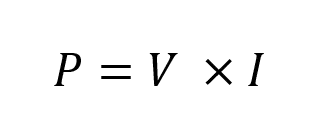
P is the DC plant power, V is its voltage and I is the load current. This type of computation can be easily integrated in Atlas, transforming the raw data monitored at the site level into actionable information. Below is an example of an interface configured in Atlas for power plant monitoring.

Figure 3: Example of an Interface Configured in Atlas for DC Plant Monitoring
In the example above, both the DC plant voltage and the load current are monitored. A user-defined status accompanies the plant voltage. These statuses are useful for users to quickly identify abnormal conditions at the sites. Furthermore, telecoms often also monitor the ambient temperature of the room in which DC plants are located. Using Atlas’ configurable statuses, users can quickly be notified if the temperature becomes too low or too high. Lastly, in this interface, Atlas automatically computes the DC plant power based on the plant voltage and load current readings using the equation above. In this particular case, since the plant voltage is 53.21 V and the load current is 536.15 A, the displayed value for the DC plant power is 28.53 kW.
3. Solution: Tracking Power Utilization with Atlas
Once the sites’ AC main power and total DC plant power data are monitored and integrated into Atlas, it becomes easy for telecom companies to determine whether their sites are utilizing power efficiently. More specifically, the Power Usage Effectiveness (PUE) is a metric used in the telecom industry to quantify efficiently energy is used at the sites. The PUE can be computed as follows:

Thus, the PUE metric provides operators a clear indication of the fraction of the total power at their sites that is dedicated to telecom equipment. As discussed in Section 2.1, the total site power corresponds to the site’s AC main entrance. On the other hand, as discussed in Section 2.2, the total equipment power corresponds to the total DC plant power for a site. Simple computations such as the site PUE can easily be configured in Atlas. More specifically, LUA scripts can be used in Atlas to automate calculations such as this one. An example of a LUA script automating the calculation of the PUE in Atlas is presented in the annex.
Hence, Atlas can be used to easily access the PUE data for different sites across a telecom network. For instance, an interface such as the one presented below can be configured in Atlas.

Figure 4: Site Dashboard to assess the PUE of a site in Atlas
In this interface, the site’s AC main power and total DC plant power are displayed. The AC main power data point is also accompanied by a custom status, making it easy for users to be quickly notified in case of a power outage. Of course, the site’s PUE is also displayed. The PUE is automatically calculated by Atlas based on the site’s main AC power and total DC plant power readings. In this example, the AC main power is 1,000 kW and the total DC plant power is 500 kW. Thus, using the equation above, Atlas computes a PUE of 2.00. This information is dynamic as the AC main power and DC plant power readings are updated, the PUE calculation will refresh as well. Moreover, this PUE value is also accompanied by a custom status, which is defined by special business rules. Atlas interface examples for configuring these statuses and business rules are presented in the annex.
Once the PUE calculations from the telecom sites are integrated into Atlas, the data from every site can be centralized and displayed in Atlas’ network view. Below is an example of a network view configured in Atlas to visualize Power Usage Effectiveness data, as well as other critical information related to the sites.

Figure 5: Network View in Atlas for centralizing the PUE and other critical information from the sites
In this interface, all the sites are displayed in a map view. As shown in Figure 5, these sites are color-coded based on user-defined statuses. In this case, the sites appear green if AC power is available at the site, and red if there is an ongoing power outage.
Below this map view is a dynamic table that can be used to visualize important information from the sites. Users can freely add and remove data in this table. In this specific example, backup power-related information, such as AC main power status, battery on-discharge indicators and generator statuses, is displayed. This interface allows users to quickly and efficiently dispatch operators when power outages occur. Most importantly, the PUE data from every site is also presented in this interface, and they are accompanied by a custom status. This allows users to quickly determine which sites are using power efficiently, and in which sites improvements can be conducted.
Finally, the PUE data from the sites can be synthesized and displayed in the Atlas dashboards, such as the one presented below.

Figure 6: Example of a dashboard configured in Atlas for sites and PUE tracking
Using these types of dashboards allows users to assess quickly the energy efficiency across their network via a snapshot and to determine whether organizational goals are being met. It is also easier for users to identify the most problematics sites and implement corrective actions. Like every other interface in the Atlas software, these dashboards are fully user-configurable and can be edited to add charts and graphs displaying different information.
4. Outputs and Benefits
As discussed above, Atlas is a powerful tool that can automatically compute Power Usage Effectiveness (PUE) data for multiple sites across a telecommunications network. Furthermore, Atlas can centralize the PUE values computed in a network view as well as in dashboards.
Centralizing the PUE data in Atlas yields the following benefits:
Quickly identify less efficient sites: Using Atlas’ network view, users can quickly determine which sites possess the highest PUE values, hence the sites using power less efficiently. Special filters enable users to target only the sites with high PUE values. Users can then implement corrective actions in sites where energy is used less efficiently.
Meet organizational goals: Identifying the sites where energy is used inefficiently enables telecom providers to implement corrective actions where the most necessary. In this manner, Atlas helps telecoms reduce energy waste and helps to meet their organizational goals related to green initiatives.
Minimize operational costs: As mentioned above, Atlas helps users reduce energy wastes where energy is used least efficiently at their sites. Since energy wastage is directly linked to higher electricity bills, Atlas can help telecom providers lower these costs.
Seamless integration with other KPIs: Since Atlas is fully user-configurable, the integration of PUE calculations across an entire network is seamless. Atlas also makes it easy to add other energy efficiency-related metrics, such as cooling efficiency and rectifier efficiency. In this manner, all metrics can be centralized in a dedicated network view in Atlas.
5. Conclusion
As cribed above, Power Usage Effectiveness (PUE) is a simple, industry-adopted metric that measures the extent in which telecommunications facilities use energy efficiently. Since energy is a major operating cost and telecom sites run continuously, PUE helps operators identify inefficient cooling systems, excessive power losses, and abnormal site behavior. Tracking PUE also supports better capacity planning, reduces energy consumption and carbon costs, enables fair comparison across sites, and acts as an early indicator of faults or misconfigurations in power and HVAC systems.
As discussed, the PUE can be automatically calculated by Atlas for many sites across a network based on AC main power and DC plant power readings. The implementation of this calculation in the software is easy and enables users to access the PUE data for all sites in the network in a single, centralized location. This facilitates users to identify the most problematic sites, implement corrective actions where needed, and ultimately reduce energy-related costs while meeting their organizational goals.
As mentioned in the previous section, other metrics, such as cooling efficiency, can also be used to describe energy efficiency. Of course, the cooling efficiency metric targets specifically the way that cooling power is used in telecom sites. In another use case, we will explore how Atlas can help users optimize their cooling infrastructure at the sites, including Heat, Ventilation and Air Conditioning (HVAC) systems.
Annex
The Power Usage Effectiveness (PUE) metric can be integrated and calculated automatically. The interface below represents the creation of the PUE property in Atlas.

Figure 7: Interface for configuring the PUE property in Atlas
In this interface, the user can name the property and specify different parameters. Most importantly, the user can configure different statuses to be associated with the property based on readings. A name, color and icon can be associated with each status.
Once the property is saved, it can be associated with sites or types of equipment. By doing so, a LUA script can be programmed. The interface below shows the LUA script to automate the calculation of the PUE in Atlas.

Figure 8: Interface for programming the LUA script for automizing the PUE calculation in Atlas
In this LUA script, the first two lines associate the sites’ total power and total DC plant power with “total_power” and the “telecom_power” variables respectively. The third line performs the PUE calculation and specifies to report this value in the Atlas interface.
User-defined business rules can also be configured in the “Asset Types” menu. The interface shown below can be used to configure these business rules in Atlas.

Figure 9: Interface to configure business rules associated with PUE statuses in Atlas


